Quick answer
Most small businesses have tried AI; far fewer use it every week. Depending on how you count, adoption runs from 82% (bought at least one tool) down to under 20% (using it in an actual business function). Owners who do use it report saving a median of 5 hours a week, worth roughly $5,600 to $9,800 a year at U.S. wage rates, against a median spend of $2,200. The fastest way in: pick one weekly task, time it, run it through one AI tool for two weeks, then time it again.
Start with two numbers that should not both be true.
In February 2026, the SBE Council surveyed 517 small business employers and found that 82% had adopted at least one AI tool. A few months later, the U.S. Census Bureau reported that AI use across American businesses hovered between 17% and 20%.
Both numbers are accurate. They measure different things, and the space between them is the most useful idea in this guide.
Having AI is not the same as using it. Plenty of small businesses have a ChatGPT login, have clicked the AI button in Canva, or let their email platform suggest a subject line. Far fewer have rebuilt even one weekly task around it. Big companies are not much further ahead. In McKinsey’s 2026 global survey, nearly nine in ten respondents said their organizations use AI regularly, yet just 6% qualified as “high performers” getting significant value from it.
This guide is about moving from the first group into the second. You’ll see what AI saves according to the data (not the marketing), what those hours are worth in dollars, what the main tools cost, where AI goes wrong, and a 30-day plan to put it to work.
No robots. No “revolution.” Just the practical version.
Key takeaways
- Adoption depends on who’s counting. 82% of employers in one survey, under 20% in Census data. The gap is between trying AI and building it into daily work.
- The time savings are real but modest. Owners report saving a median of 5 hours a week. At government wage data, that’s roughly $5,600 to $9,800 of work a year, against a median AI spend of $2,200.
- Research backs the gains, with a warning. AI made support agents 14% more productive in one large study, and made weaker business owners perform worse in another.
- Free plans are fine for experimenting. Move to a business plan before you paste in customer data.
- You own what AI says for you. A tribunal made Air Canada pay for its chatbot’s mistake.
- Start with one repetitive task. Time it, try AI on it, time it again.
What’s in this guide
- How many small businesses actually use AI?
- What AI actually saves, and what that’s worth
- What small businesses use AI for
- The tools: a short list with real prices
- The risks nobody puts in the sales pitch
- What owners say when nobody’s selling
- How to start: a 30-day plan
- Ten prompts to start with
- Free training and help worth knowing about
- AI or a new hire?
- Frequently asked questions
- What comes next
How Many Small Businesses Actually Use AI?
Ask four credible sources and you get four answers. That doesn’t mean anyone got it wrong. Each one asked a different question.
| Source | Finding | What they actually measured |
|---|---|---|
| SBE Council (2026) | 82% | Employers with 2–99 staff that have adopted at least one AI tool. Online survey of 517, February 2026. |
| NFIB (2025) | 24% | Small business owners who currently use AI tools such as ChatGPT, Copilot, or Canva. |
| U.S. Census Bureau (2026) | 17%–20% | Businesses using AI in any business function, December 2025 to May 2026. |
| JPMorganChase Institute (2026) | 17.7% | Small businesses paying for AI services, measured from bank transaction data at the end of 2025. |
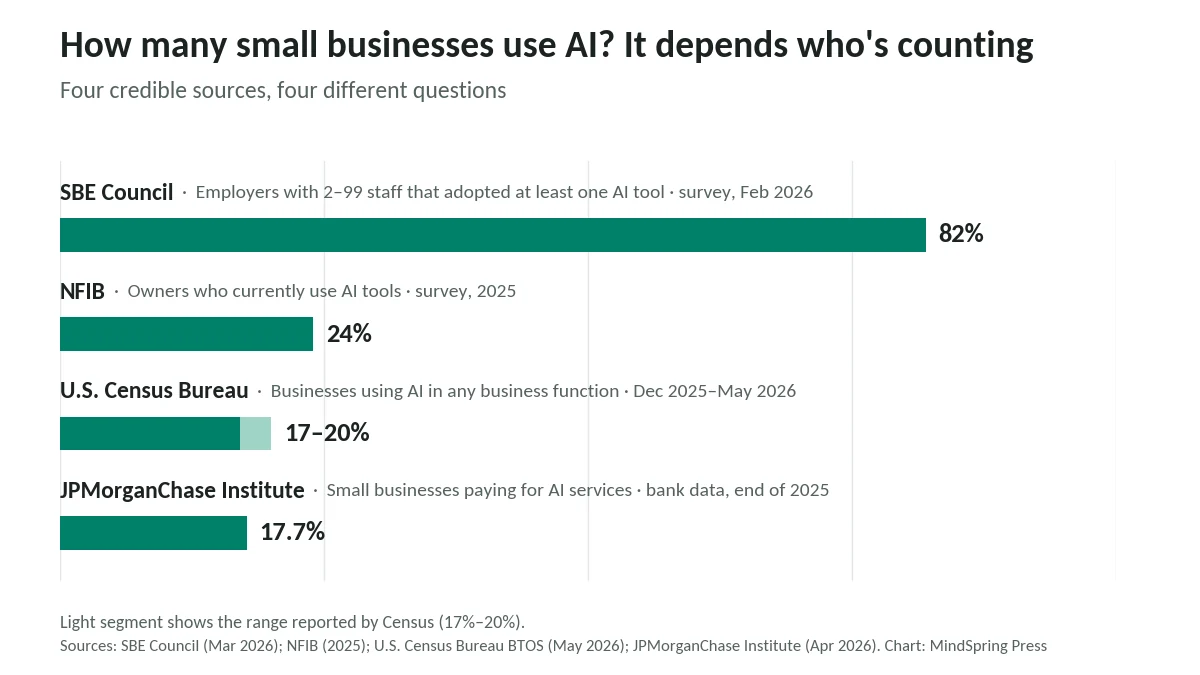
So what’s the real number? A fair reading: most small business employers have tried AI, and roughly one in five use it enough to show up in government statistics or pay for it.
The details under the headline matter more:
- The smallest firms are standing still. Census found AI use grew among firms with 20 or more employees between December 2025 and May 2026, but showed no significant change among smaller ones. Fewer than 20% of firms with four or fewer employees reported using AI.
- Having a team matters. In the JPMorganChase data, employer businesses adopted AI at roughly double the rate of businesses without employees: 26.1% versus 15.3%.
- Industry matters even more. Adoption reached 39.3% in information businesses and 30.3% in professional services, but only 8.9% in construction and 5.4% in transportation and warehousing.
- The people who find a use keep paying. JPMorganChase found the ratio of consistent to occasional AI payers climbed to nearly 1.8 in 2025, a sign that businesses are moving past experimentation.
If you run a three-person landscaping crew and feel behind on AI, you’re not. You’re in the majority.
That’s the opportunity.
What AI Actually Saves, and What That’s Worth
You’ve probably seen claims that AI saves business owners 10 to 20 hours a week. We couldn’t find a credible source for that. Here’s what the surveys found:
- Small business owners in the SBE Council survey reported saving a median of 5 hours a week. Across their employees, the median was 11.5 hours a week.
- Business.com’s 2026 survey of 1,009 workers at small companies put the average at 5.6 hours a week, with managers saving 7.2 hours and individual contributors 3.4.
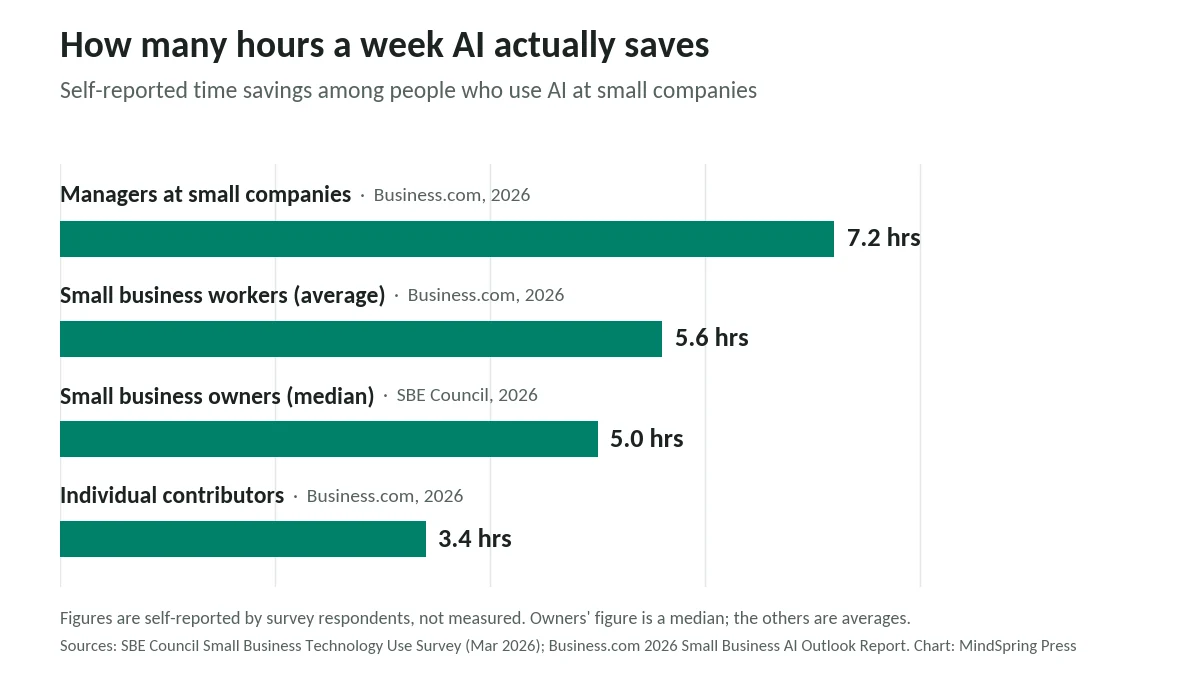
Both figures are self-reported, so treat them as estimates. Still, two separate surveys landing near five hours is a reasonable signal.
Putting a dollar figure on five hours
Five hours a week adds up to 260 hours a year. To see what that’s worth, we priced those hours using the Bureau of Labor Statistics’ May 2025 median wages for the kinds of work AI most often takes on.
| If the 260 hours were… | BLS median wage | Value per year |
|---|---|---|
| Administrative work | $23.23/hour | $6,040 |
| Customer service | $21.53/hour | $5,598 |
| Bookkeeping | $24.36/hour | $6,334 |
| Marketing work | $37.87/hour | $9,846 |
Now compare that with what small businesses spend. The same SBE Council report found the median annual investment in AI tools is $2,200.
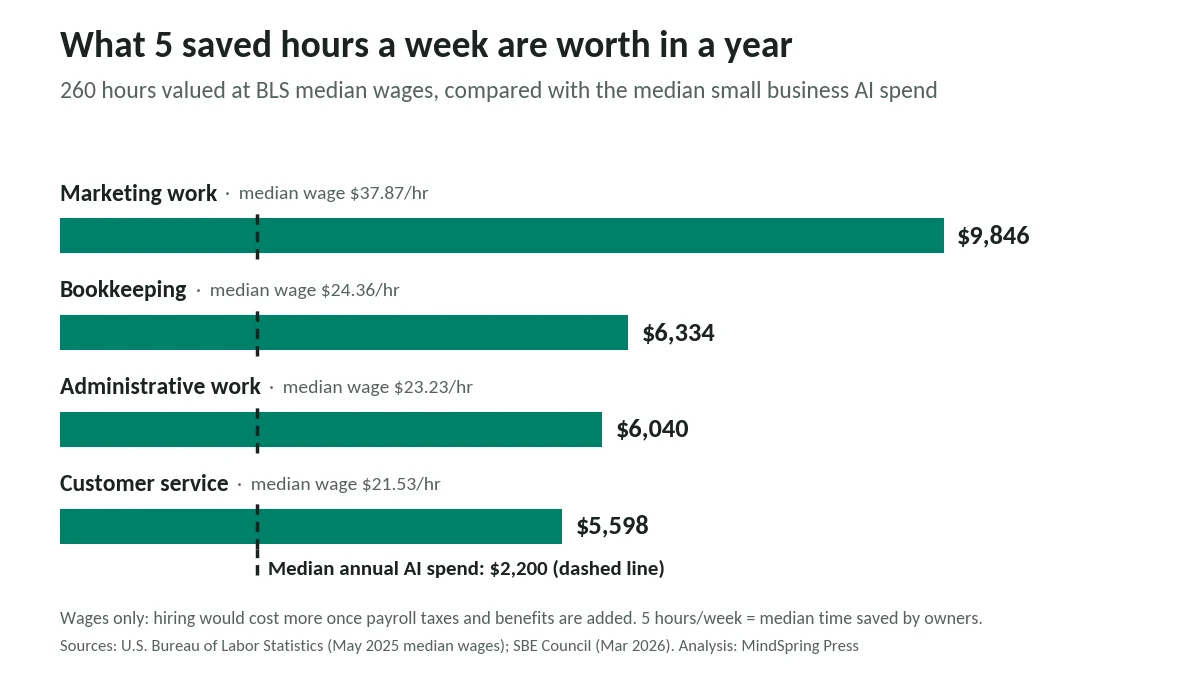
Two honest caveats, because this math is easy to abuse. First, these are wages only; actually hiring someone costs more once payroll taxes and benefits are added, so the comparison is conservative. Second, a saved hour is only worth something if it goes to work that matters. If your five hours disappear into more email, the value is zero.
What the controlled studies show
Surveys capture what people believe. A handful of rigorous studies measured what actually happened, and they add an important twist.
- Customer support. In a study of more than 5,000 support agents, access to an AI assistant raised issues resolved per hour by 14% on average, including a 34% improvement for novice and low-skilled workers. Experienced agents saw little change.
- Writing. In an experiment with 453 college-educated professionals published in Science, ChatGPT cut the time spent on writing tasks by 40% and raised quality by 18%.
- Running a business. A field experiment gave Kenyan entrepreneurs a GPT-4 business advisor over WhatsApp. High performers improved by just over 15%, while low performers did about 8% worse. The researchers traced the difference to which pieces of advice owners chose to act on.
That last study is the one to remember.
AI doesn’t replace business judgment. It amplifies whatever judgment you bring to it. Good instincts get faster; shaky ones get more confident. MIT economist and Nobel laureate Daron Acemoglu, one of the more skeptical voices on AI, put the balance well in a 2026 interview with Fortune:
It’s not that you cannot get big productivity gains from automation.
Daron Acemoglu, Institute Professor, MIT
His caveat is that those gains are harder to capture than most people assume. The rest of this guide is about capturing them anyway.
What Small Businesses Use AI For
The most common uses are less glamorous than the headlines. That’s good news, because unglamorous means easy to start.
When NFIB asked owners what they use or plan to use AI for, the top answers were:
- Communications such as email, memos, and documents: 29%
- Marketing or advertising: 27%
- Business or predictive analysis: 14%
- Customer service: 9%
- Accounting: 4%
The SBE Council’s 2026 survey sorts things a little differently: general business research (37%) and content creation (30%) lead, followed by marketing automation, project management, and social media management at 25% each. The same report found the median business uses five AI tools, which may explain why so many owners feel busy with AI without feeling the benefit.
Here’s how that looks in practice.
Marketing
Content is where most owners start, because the blank page is the enemy. AI can draft social posts, product descriptions, newsletters, blog outlines, and ad variations in minutes. Your job shifts from writing to editing.
Email deserves special attention. In Litmus’s 2025 State of Email survey of nearly 500 marketers, 35% said they get $10 to $36 back for every $1 spent on email, and another 30% get $36 to $50. Litmus sells email software, so read that with some skepticism. But email is one of the few channels you fully own, and AI helps with the parts owners skip: subject line tests, welcome sequences, and follow-ups.
Marketing gets the full treatment in our complete guide to AI marketing for small businesses.
Customer service
Customer expectations have shifted. In Zendesk’s CX Trends 2026 research, 74% of consumers said they now expect 24/7 service because of AI. Zendesk sells support software too, but anyone who checks a contact inbox at 10 p.m. knows the pressure is real.
A small team can use AI to:
- answer predictable questions about hours, pricing, bookings, and order status
- draft replies to complaints and refund requests for a person to approve
- turn your best answers into an FAQ page, so fewer questions arrive at all
Keep a human in the loop. The risks section below shows exactly what happens when a business doesn’t.
Composite example: a three-chair hair salon
This is a composite example built from common patterns, not a specific business.
The salon gets dozens of booking and pricing questions a week through Instagram and its website. The owner writes out a dozen standard answers once, in her own words. An AI assistant drafts each reply from those answers, and she approves it before it goes out. Drafting takes seconds; approving takes a glance. The weekly inbox session shrinks from most of an evening to a fraction of it, and the replies still sound like her.
Admin, finance, and operations
This is where the quiet hours go: summarizing documents, writing proposals and procedures, chasing invoices, and re-typing data from one place into another.
One owner put a number on it. Kevin English, who runs contractor products company Keg Built, was quoted in OpenAI’s small business announcement (reported by TechInformed):
On one 30-page contractor quote, ChatGPT saved me at least 10 hours of data entry.
Kevin English, owner, Keg Built
Software companies are now building AI directly into the tools small businesses already use. At Fortune’s Brainstorm AI conference in December 2025, Intuit’s chief AI officer said its AI agents save customers about 12 hours a month on routine tasks. Intuit CEO Sasan Goodarzi made the more useful point on the same stage:
Customers don’t care about AI. Everybody talks about AI, but the reality is a consumer is looking to increase their cash flow.
Sasan Goodarzi, CEO, Intuit
That’s the right way to judge every idea in this guide. Nobody needs AI. You need the invoice paid.
Real example: ATV Big Air Tour (vendor case study)
ATV Big Air Tour is an event business run by two co-founders, Larissa and Derek Guetter. According to OpenAI’s case study, ChatGPT cut their weekly review of event listings from about 8 hours to 1, and turned a merchandise inventory and reorder process that took two to three days into two to three hours.
“We’re a team of two, but using ChatGPT Work lets us compete with businesses that have much bigger budgets and teams.”
Note: OpenAI published this story about its own product, and the figures are self-reported by the business.
For a longer list of jobs worth handing off, see 25 everyday tasks AI can automate.
The Tools: A Short List With Real Prices
Most small businesses need one general AI assistant, plus AI features inside the software they already pay for. That’s usually it. A dozen subscriptions is a hobby, not a system.
We checked each company’s official pricing page on September 17, 2026. AI pricing changes often, so confirm before you buy.
| Tool | Best for | Paid plans (USD) | Trains on your data? |
|---|---|---|---|
| ChatGPT (OpenAI) | General writing, research, analysis | Business: $25/user/month, or $20 billed annually (2-user minimum) | Business: “No training on your business data by default” |
| Claude (Anthropic) | Long documents, careful writing | Pro: $20/month, or $17 billed annually. Team: $25/seat/month, or $20 annually (2-seat minimum) | Free and Pro: you can opt out. Team: none by default |
| Notion AI | Notes, docs, meeting summaries | Plus: $10/member/month (AI trial only). Business: $20/member/month with full AI | “Will not use your data to train our models unless you opt in” |
| Gemini in Google Workspace | Teams that live in Gmail, Docs, and Sheets | Included in paid Workspace plans: limited on Business Starter, expanded from Business Standard up | Check Workspace’s data terms for your plan |
Microsoft 365 Copilot does the same job inside Word, Excel, and Outlook, sold as an add-on to a Microsoft 365 business subscription. Check Microsoft’s current pricing, since it changes frequently.
Our take: a free or individual plan is fine while you experiment with your own ideas. The day you paste in customer names, client files, or financials, move to a business plan where training is off by default, and read the data terms once. It takes ten minutes.
For category-by-category recommendations, including design, automation, and CRM tools, see our guide to the best AI tools for small businesses.
The Risks Nobody Puts in the Sales Pitch
AI tools sound confident whether they’re right or wrong.
That’s the whole problem.
It makes things up, and you’re still responsible
In June 2023, a federal judge in Manhattan fined two New York lawyers and their firm $5,000 after they filed a brief citing court cases that ChatGPT had invented, as CNBC reported at the time.
The next year, a Canadian tribunal ordered Air Canada to compensate a traveler after its website chatbot gave him wrong information about bereavement fares. The airline argued, in effect, that the chatbot was responsible for its own words. The tribunal disagreed: Air Canada was responsible for all the information on its website, whether it came from a static page or a chatbot.
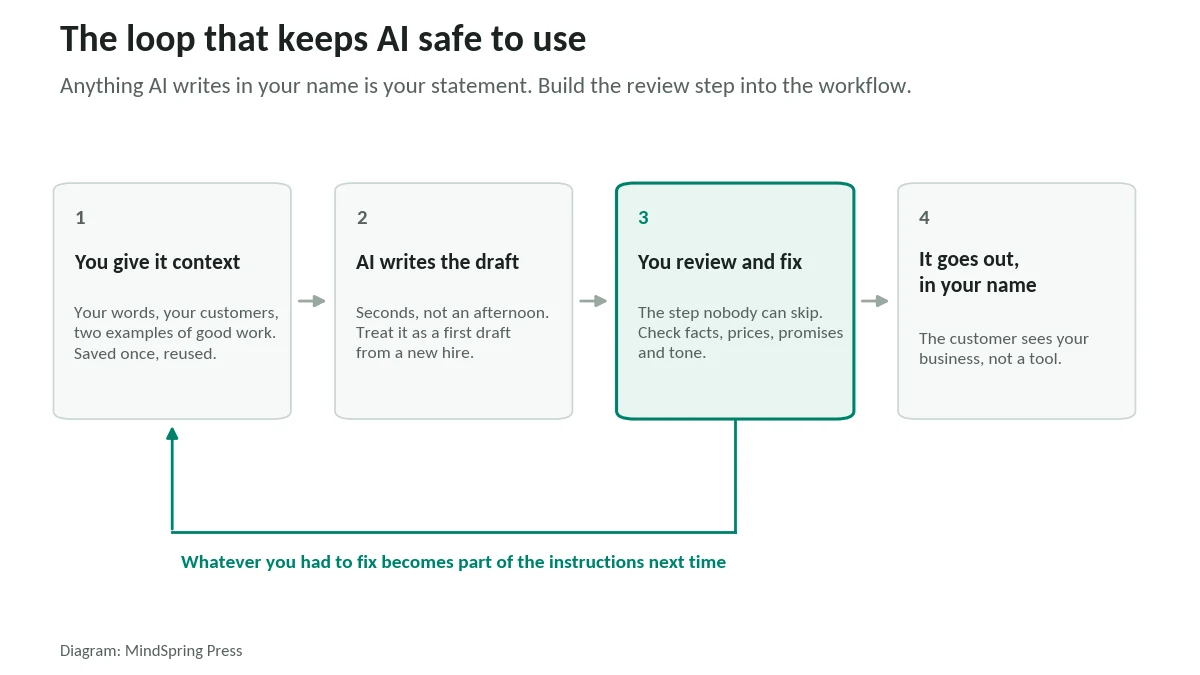
For a small business the lesson is simple. Anything AI writes in your name, whether it’s a quote, a refund policy, or a price, is your statement. Review it the way you’d review a new hire’s work on day one.
Your data may be training someone else’s model
As the tool table shows, business plans generally switch model training off by default, while individual plans often leave it on unless you opt out. Before you paste in anything about a customer, check which plan you’re on.
The rules are catching up
This section is general information, not legal advice.
- The FTC is watching AI claims. Its 2024 “Operation AI Comply” sweep included action against Rytr, an AI writing service the FTC said let subscribers generate fake consumer reviews. “Using AI tools to trick, mislead, or defraud people is illegal,” then-FTC Chair Lina Khan said (FTC). Never use AI to write reviews or testimonials for your business.
- States are writing their own laws. Texas’s Responsible Artificial Intelligence Governance Act took effect on January 1, 2026. Colorado repealed its original AI Act in May 2026 and replaced it with a narrower transparency law covering automated decisions in areas like employment, housing, and lending, scheduled to take effect January 1, 2027, once the state attorney general completes its rules (Skadden). If you use AI to screen job applicants, read our guide to AI hiring for small businesses.
- You may not own purely AI-generated work. The U.S. Copyright Office concluded in January 2025 that AI output is protected only where a human author has determined sufficient expressive elements, and that simply writing prompts isn’t enough. Your edits, choices, and arrangement are what make the work yours.
The hype
In June 2025, Gartner predicted that over 40% of agentic AI projects will be canceled by the end of 2027, “due to escalating costs, unclear business value or inadequate risk controls.” Gartner analyst Anushree Verma added that most agentic AI propositions “lack significant value or return on investment.”
So when a vendor offers you an autonomous “AI employee” that runs your business, keep your card in your wallet and ask for a trial.
What Owners Say When Nobody’s Selling
One of the more honest threads on Reddit’s r/Entrepreneur asks a question every owner should ask:
For small business owners who’ve actually tried AI tools – did it genuinely reduce any stress or workload, or just add another thing to manage?
Discussion title, r/Entrepreneur, September 2025
Across owner discussions like that one, the same five worries keep coming up:
- Is it worth paying for?
- Does it save time, or add one more tool to manage?
- Can I trust it with anything a client will see?
- How long will setup take?
- How much of this is hype?
Our answer to all five is the same. Pick one task you already do every week. Time it. Try AI on it for two weeks. Time it again. Your own numbers will beat any survey, including every one quoted in this guide.
Karen Kerrigan, president and CEO of the SBE Council, gave similar advice about business data in a July 2026 interview, and it applies just as well to AI:
Start with decisions, not dashboards.
Karen Kerrigan, President & CEO, SBE Council
Start with the business question. The tool comes second.
How to Start: A 30-Day Plan
Our companion guide, How Small Businesses Can Start Using AI Today, walks through first steps in detail. Here’s the month at a glance.
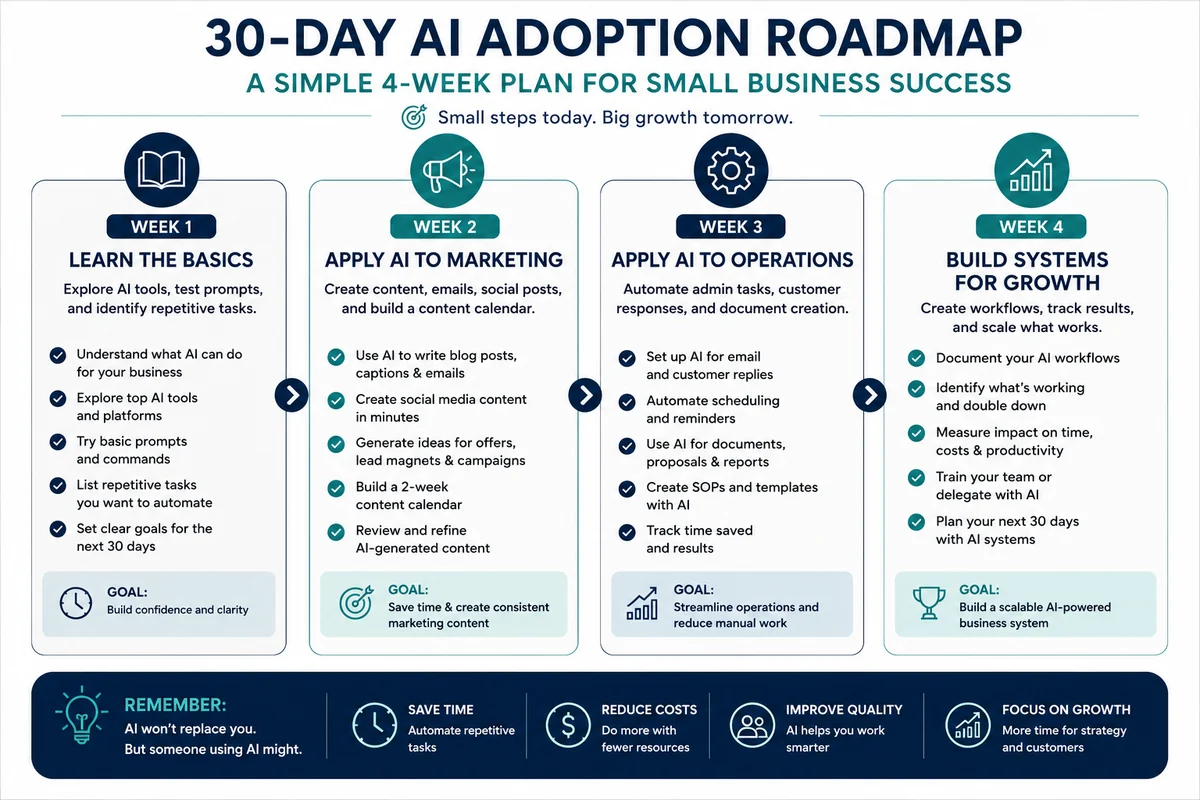
Week 1 — Learn the basics, and pick your task. Open a free account with one general AI assistant. One. Spend fifteen minutes a day testing it on real work so you learn what it does well and where it bluffs. Then list the repetitive jobs you do every week and choose the one to start with: frequent, low-risk, mostly text. Write down how long that task takes you today. That number is your baseline.
Week 2 — Put it to work on marketing. This is where most owners see time back first: social captions, emails, blog outlines, offers, and a two-week content calendar. Give the AI your context once (what you sell, who buys, how you sound, two examples of past work) and save it as a reusable prompt. Our 50 ChatGPT prompts for small businesses can save you that setup.
Week 3 — Move into operations. Draft customer replies, summarize documents, turn rough notes into quotes and proposals, write the standard procedures you’ve never had time to write. Review every output before it leaves your hands, and keep a note of what you had to fix. That list becomes better instructions.
Week 4 — Build the system and measure it. Time your Week 1 task again. Write down the workflow that produced the saving, so it survives a busy month. Keep what earned its place, drop what didn’t, and choose the next task. If a tool isn’t working, try a different task before you try a different tool.
That’s it. No transformation program. One task at a time, measured.
Ten prompts to start with
A plan is only as good as what you actually type. These ten cover the jobs a small business runs into most — written out in full, ready to paste. Fill in anything in [square brackets] with your own details. Do number one first: it makes every prompt after it sound like you rather than like a robot.
Build your Voice Card
Start here
Use this once, then paste the result at the top of every other prompt.
Help me build a “Voice Card” that captures how my business sounds, so I can paste it into any AI prompt and get output that sounds like me. Ask me about my tone, the words I use and avoid, my level of formality, who I’m talking to, and a sample of my real writing: [paste 2–3 things you’ve written]. Then summarize my voice in a short, reusable paragraph.
Teach the AI about your business once
Start here
Use this to create a reusable “brief” that saves you re-explaining yourself.
Help me write a short, reusable business brief I can paste at the start of any chat so I don’t have to re-explain myself every time. Cover what my business does, who my customers are, my offers, my voice, and my goals. Ask me what you need, then produce a tight version I can keep and update.
Find the words your customers actually search
Get found
Use this before you write a single line of website or profile copy.
Here is my ideal customer: [who they are, the problem they had, the result I gave them]. List the 15 exact phrases this person was probably typing into Google the week before they hired someone like me. Write them the way a normal, slightly worried person types — not the way a marketer would. Group them into “urgent now,” “researching,” and “comparing prices.”
Write a Google Business Profile description that ranks
Get found
Use this to fill out or rewrite your Google Business Profile “from the business” section.
Write a 750-character Google Business Profile description for my business. My business: [name, what you do, who you serve, area you cover]. Naturally include these search phrases without keyword-stuffing: [paste 5–6 phrases from the previous prompt]. Lead with the customer’s problem, sound human and local, and end with a clear next step.
The one-piece-to-ten repurposing machine
Make content
Use this every time you make one good piece of content. This is the highest-leverage prompt in the book.
Take this one piece of content and repurpose it into: three short social posts, one email to my list, two Google Business posts, and a two-line description for my profile. Keep the core message identical; change only the length and tone for each format. Content: [paste]. My voice in three words: [words].
A five-email welcome sequence
Use this to turn a new subscriber into someone who knows, likes, and trusts you.
Draft a 5-email welcome sequence for someone who just joined my list or downloaded my free guide. My business: [describe]. Email 1: deliver the thing + a warm hello. Emails 2–4: one genuinely useful idea each, no pitch. Email 5: a soft invitation to work with me. Each under 150 words. Tone: [three words].
The follow-up most businesses never send
Win the sale
Use this to build the follow-up sequence that wins deals the first message didn’t.
Write a 4-message follow-up sequence for a warm lead who asked about [my service] and then went quiet. Space them sensibly over two weeks. Each one should add a little value or remove a little friction — never just “checking in.” My business: [describe]. Keep each under 100 words and easy to reply to.
A same-day review request that works
Reviews
Use this the day you finish a job, when gratitude is highest.
Write a short, warm review request to send the same day I finish helping a customer. Reference the specific thing I did: [the job]. Make it easy (mention the direct link), explain that it helps a small business and the next nervous customer, and keep it genuine. My business: [name]. Under 60 words.
Reply to a negative review without getting defensive
Reviews
Use this for the one-star review that makes your stomach drop.
Write a calm, professional reply to this negative review: [paste]. Acknowledge their experience, take genuine responsibility where it’s fair, don’t argue the details in public, and offer to make it right offline with a real contact. Sign it as the owner. My business: [name]. Keep it human and short.
Plan your week around what matters
Run the business
Use this on a Sunday or Monday morning to take control of the week.
Help me plan my work week. Here’s everything on my plate: [brain-dump your tasks]. Sort them into: do now (high impact, urgent), schedule (high impact, not urgent), delegate or simplify, and drop. Then suggest a realistic order for the three things that would most move my business forward this week.
Free Training and Help Worth Knowing About
You don’t have to work this out alone, and a surprising amount of help is free.
- U.S. Chamber of Commerce: Small Business B(AI)sics. Launched in April 2026 with support from Google.org, it offers free online courses and in-person workshops through local chambers, with a goal of reaching 40,000 small businesses.
- Your local Small Business Development Center. Some SBDCs already offer AI coaching through AI U, a Google-backed program. In January 2026, the U.S. House passed the AI for Main Street Act by 395 votes to 14; the bill would make AI guidance and training a standard part of SBDC services.
- OpenAI: ChatGPT for Small Businesses. Announced in July 2026, with virtual training, in-person AI academies, and workflow guides.
- Anthropic: Claude for Small Business. Launched in May 2026, it connects Claude to tools such as QuickBooks, PayPal, HubSpot, and Google Workspace, asks the owner to approve plans before acting, and came with free half-day workshops in U.S. cities.
The last two are run by companies that sell AI tools. They can be useful, but treat them as product training.
AI or a New Hire?
Sooner or later, a growing business hits the question: automate it, or hire someone?
A working rule: if a task can be written down as steps and its output checked in a minute, try AI first. If it depends on trust, taste, relationships, or accountability when things go wrong, hire a person. Most small businesses end up doing both, with AI handling the drafts and people handling the decisions.
The dollar figures earlier help frame it. 260 hours of administrative work is worth about $6,040 in wages alone; a part-time hire costs more than that, and an AI subscription costs far less, but only one of them can pick up the phone. We run the full comparison, with a decision framework, in AI vs Hiring Additional Staff.
Frequently Asked Questions
How many small businesses use AI?
It depends on the definition. The SBE Council found 82% of small business employers have adopted at least one AI tool, NFIB found 24% of owners currently use AI, and U.S. Census Bureau data puts AI use in business functions at 17% to 20%. The lower numbers reflect regular, embedded use.
How much time does AI save a small business?
Owners in the SBE Council’s 2026 survey reported a median of 5 hours a week. Business.com’s 2026 survey found an average of 5.6 hours a week for workers at small companies. Both are self-reported.
How much do small businesses spend on AI?
The SBE Council’s 2026 survey found a median annual investment of $2,200 in AI tools.
Can a small business use AI for free?
Yes. ChatGPT, Claude, and Notion all offer free plans, and free tiers are fine for learning. For anything involving customer or client information, a business plan with model training off by default is the safer choice.
Is it safe to put customer information into AI tools?
Only on a plan whose data terms you’ve checked. OpenAI’s ChatGPT Business, Anthropic’s Claude Team, and Notion all state that they don’t train on business customers’ data by default. Individual plans often do unless you opt out.
Will AI replace my employees?
The evidence points to AI changing jobs more than eliminating them in the near term. In one large study, AI helped less experienced support agents the most. Economist Daron Acemoglu estimates only about 5% of tasks will be profitably automated in the near term.
Do I own content that AI creates for my business?
Not automatically. The U.S. Copyright Office says purely AI-generated material isn’t protected; your human edits, selection, and arrangement can be. Treat AI output as a draft you shape.
What Comes Next
Three shifts are worth watching over the next year or two.
AI is moving inside the software you already use. Instead of copying text between a chat window and your accounting app, tools like Claude for Small Business and Intuit’s agents are connecting AI directly to invoicing, payroll, and CRM systems, with an approval step before anything happens. That’s where the hours are.
Agents are coming, slowly. In McKinsey’s 2026 survey, 22% of respondents at smaller organizations said they are scaling AI agents, compared with 40% at large ones. Gartner’s cancellation forecast is a reminder that a lot of those projects won’t survive contact with reality.
The gains will be steady, not sudden. Acemoglu’s estimate that only about 5% of tasks will be profitably automated in the near term may sound deflating. For a small business it’s freeing. You don’t need to automate everything. You need to find your 5% before your competitors find theirs.
Final Thoughts
Go back to those two numbers from the start: 82% of employers have AI, yet only about one in five businesses use it in a way that shows up in the data.
The advantage doesn’t belong to the business with the most tools. It belongs to the one that picked a task, measured it, and kept going.
Choose one task this week. Time it. Try AI. Time it again.
If you’d like the step-by-step version, with workflows and ready-to-use prompts for each part of a small business, that’s why we wrote AI Shortcut for Small Businesses.
Sources
Every figure in this guide links to its original source. Where a source is named in the text without a link, it appears here.
- MindSpring Press, Editorial Policy. mindspringpress.com
- SBE Council, “Small Business Owners Accelerate Adoption and Investments in Digital Solutions” (press release, 2026 Small Business Technology Use Survey). Mar 11, 2026. sbecouncil.org
- U.S. Census Bureau, “Large Firms With at Least 20 Employees Biggest AI Users” (Business Trends and Outlook Survey). May 2026. www.census.gov
- McKinsey & Company, “The state of AI in 2026: On the road to ROI”. Aug 2026. www.mckinsey.com
- NFIB, Small Business and Technology Survey (PDF). 2025. www.nfib.com
- JPMorganChase Institute, “Understanding the use of AI among small businesses”. Apr 2026. www.jpmorganchase.com
- SBE Council, Small Business Technology Use Survey, full report (PDF). Mar 2026. sbecouncil.org
- Business.com, 2026 Small Business AI Outlook Report. Updated Jan 20, 2026. www.business.com
- U.S. Bureau of Labor Statistics, Occupational Outlook Handbook: Secretaries and Administrative Assistants. May 2025 wage data. www.bls.gov
- U.S. Bureau of Labor Statistics, Occupational Outlook Handbook: Customer Service Representatives. May 2025 wage data. www.bls.gov
- U.S. Bureau of Labor Statistics, Occupational Outlook Handbook: Bookkeeping, Accounting, and Auditing Clerks. May 2025 wage data. www.bls.gov
- U.S. Bureau of Labor Statistics, Occupational Outlook Handbook: Market Research Analysts. May 2025 wage data. www.bls.gov
- Brynjolfsson, Li & Raymond, “Generative AI at Work,” NBER Working Paper 31161. 2023. www.nber.org
- Noy & Zhang, “Experimental evidence on the productivity effects of generative artificial intelligence,” Science. Jul 2023. www.science.org
- Otis, Clarke, Delecourt, Holtz & Koning, “The Uneven Impact of Generative AI on Entrepreneurial Performance,” SSRN. 2024. papers.ssrn.com
- Fortune, “Nobel Laureate Daron Acemoglu on the ‘brainless’ AI discourse…” (Nick Lichtenberg). Jun 21, 2026. fortune.com
- Litmus, “The ROI of Email Marketing” (2025 State of Email survey). 2025. www.litmus.com
- Zendesk, CX Trends 2026 press release. Nov 18, 2025. www.zendesk.com
- TechInformed, “OpenAI adds hands-on AI support for small businesses”. Jul 27, 2026. techinformed.com
- Fortune, “‘Customers don’t care about AI’ — they want to boost cash flow” (Brainstorm AI coverage). Dec 9, 2025. fortune.com
- OpenAI, ATV Big Air Tour customer story. Sep 2, 2026. openai.com
- OpenAI, ChatGPT Business pricing. Checked Sep 17, 2026. openai.com
- Anthropic, Claude plans and pricing. Checked Sep 17, 2026. claude.com
- Notion, pricing and AI data FAQ. Checked Sep 17, 2026. www.notion.com
- Google Workspace, pricing. Checked Sep 17, 2026. workspace.google.com
- American Bar Association, Business Law Today, “BC Tribunal Confirms Companies Remain Liable for Information Provided by AI Chatbot”. Feb 2024. www.americanbar.org
- Federal Trade Commission, “FTC Announces Crackdown on Deceptive AI Claims and Schemes”. Sep 25, 2024. www.ftc.gov
- Texas Legislature, HB 149 (Texas Responsible Artificial Intelligence Governance Act), enrolled text. 2025. capitol.texas.gov
- Skadden, “Colorado Repeals and Replaces Its AI Act”. Jun 2026. www.skadden.com
- Library of Congress Newsroom, “Copyright Office Releases Part 2 of Artificial Intelligence Report”. Jan 29, 2025. newsroom.loc.gov
- Gartner, “Gartner Predicts Over 40% of Agentic AI Projects Will Be Canceled by End of 2027”. Jun 25, 2025. www.gartner.com
- Reddit, r/Entrepreneur discussion thread. Sep 2025. www.reddit.com
- SBE Council, “Kerrigan in Biz Tech: Here’s How Small Businesses Can Get More Value from Their Data”. Jul 21, 2026. sbecouncil.org
- U.S. Chamber of Commerce, launch of Small Business B(AI)sics free AI training. Apr 29, 2026. www.uschamber.com
- FedScoop, “House passes two AI-focused SBA bills”. Jan 2026. fedscoop.com
- Fox News, “House passes AI for Main Street Act with overwhelming bipartisan support”. Jan 2026. www.foxnews.com
- Anthropic, “Introducing Claude for Small Business”. May 13, 2026. www.anthropic.com