Quick answer
Pick one repetitive task, try it with one free AI tool (ChatGPT, Claude, Gemini or Copilot) for a week, and compare the result with doing it by hand. If it saves time, make it a habit before adding a second tool. You don’t need technical skills or a budget: most popular tools have free plans, and 58% of US small businesses already use generative AI.
If you run a small business, you’ve probably heard the phrase “artificial intelligence” thrown around so often that it’s started to feel like background noise. Big tech companies talk about it. Your competitors hint at it. And somewhere along the way, you may have quietly assumed that AI for small businesses is something reserved for corporations with deep pockets and entire data-science teams.
Here’s the good news: that assumption is completely outdated.
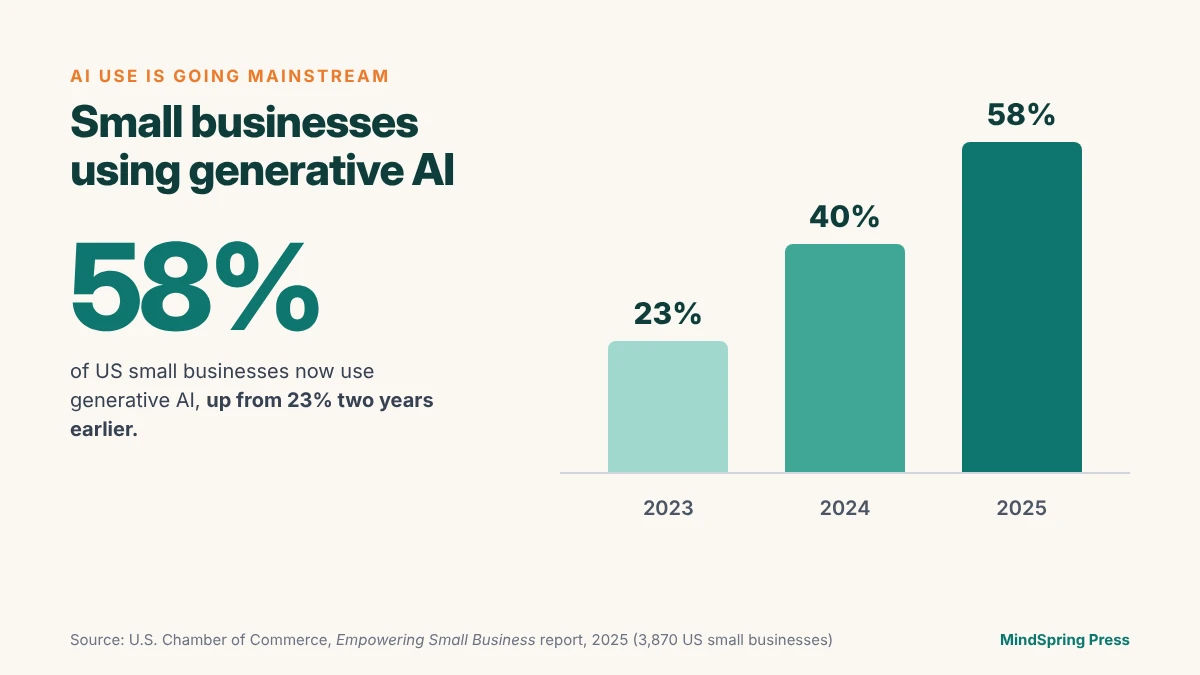
Today, some of the most powerful AI tools on the planet are sitting one click away, many of them free or costing less than your monthly coffee budget. And small businesses have noticed. 58% of US small businesses now say they use generative AI, up from 40% just a year earlier, according to the U.S. Chamber of Commerce.
You don’t need a computer science degree. You don’t need to write a single line of code. And you certainly don’t need a Silicon Valley budget. If you can send an email or post on social media, you already have the skills to start.
This guide breaks down exactly how to begin — in plain language, with practical steps you can act on this week. If you want the wider picture first, our complete guide to AI for small businesses covers the tools, the benefits, and a 30-day adoption plan in depth.
Why AI Matters for Small Businesses Right Now
Time and money are the two things every small business owner never has enough of. AI tackles both.
Think about how much of your week disappears into repetitive tasks: answering the same customer questions, writing product descriptions, scheduling social posts, sorting through invoices, or drafting emails. These tasks are necessary, but they rarely grow your business. They just keep it running. Marketing alone is a squeeze: in a 2025 survey of 2,500 small businesses, 42% said they have less than one hour a day for marketing (Constant Contact).
This is where AI tools for small businesses shine. They handle the repetitive, time-draining work so you can focus on what actually matters — serving customers, building relationships, and growing revenue. In effect, AI gives a one-person shop the muscle of a much bigger team.

And the playing field has genuinely leveled. A decade ago, advanced automation and data analysis were luxuries only large corporations could afford. Now a local bakery, a freelance designer, or a neighborhood accounting firm can tap into the same intelligence — and they are doing it fast. In 2023, only 23% of US small businesses said they used generative AI. By 2025, that figure had reached 58%.
Those who start tend to stay. In an October 2025 survey of 1,471 owners in the Goldman Sachs 10,000 Small Businesses program, 94% of those using AI said it was having a positive impact on their business (Goldman Sachs).
If you haven’t started yet, don’t worry — you’re not late. The U.S. Census Bureau, which surveys a much broader range of firms, puts AI use at about one in five US businesses (19.8% in spring 2026), and under 20% for businesses with four or fewer employees. Plenty of your peers are still at the starting line. Starting now puts you ahead of most of them.
Busting the Biggest Myth: “AI Is Too Complicated for Me”
Before we get practical, let’s clear up the single biggest barrier holding owners back: the belief that AI is too technical or too expensive.
Modern AI tools are designed for everyday people, not engineers. Most of them work exactly like a chat conversation — you type what you want in plain English, and the tool responds. There’s no setup nightmare, no manual to memorize, and no risk of “breaking” anything. And most of the popular ones have a free plan, so trying one costs you nothing but a few minutes.
If you still feel unsure, you’re in good company. Even among owners who already use AI, 47% say it’s hard to choose the right tools and 45% say they lack technical expertise (Goldman Sachs). Feeling a little lost at the start is normal. It’s exactly why the approach in this guide is to start with one tool and one task.
The truth is, the hardest part of using AI isn’t the technology. It’s simply getting started. Once you try it for one small task and see the result, the lightbulb goes on. So let’s find that first task.
Where Small Businesses Can Start Using AI Today
Many owners assume AI just isn’t relevant to a business like theirs. When the U.S. Small Business Administration looked at why the smallest firms (fewer than five employees) weren’t planning to use AI, nearly 82% said it wasn’t relevant to them. Usually, that’s because they haven’t yet seen what it can do for a business their size. The five areas below are where most owners find their first win.
You don’t need to overhaul your entire operation. The smartest approach is to pick one or two of these areas where AI can deliver an instant win.
1. Marketing and Content Creation
If there’s one area where AI delivers an immediate payoff, it’s marketing. Creating consistent, high-quality content is one of the most common struggles for small business owners — and it’s where most of them begin. Constant Contact’s 2025 survey found that 48% of small businesses already use AI in their marketing. The most common use is writing email and social media copy (37%), followed by creating visuals (29%).
With a tool like ChatGPT, Claude, or Google Gemini, you can:
- Write social media captions for an entire month in minutes
- Draft email newsletters that actually sound like you
- Generate blog post ideas (and full drafts) for your website
- Create product descriptions that highlight benefits, not just features
- Brainstorm catchy headlines, slogans, and promotional offers
Need visuals too? AI-powered design platforms like Canva now include built-in tools that generate graphics, resize images for every platform, and even remove backgrounds automatically.
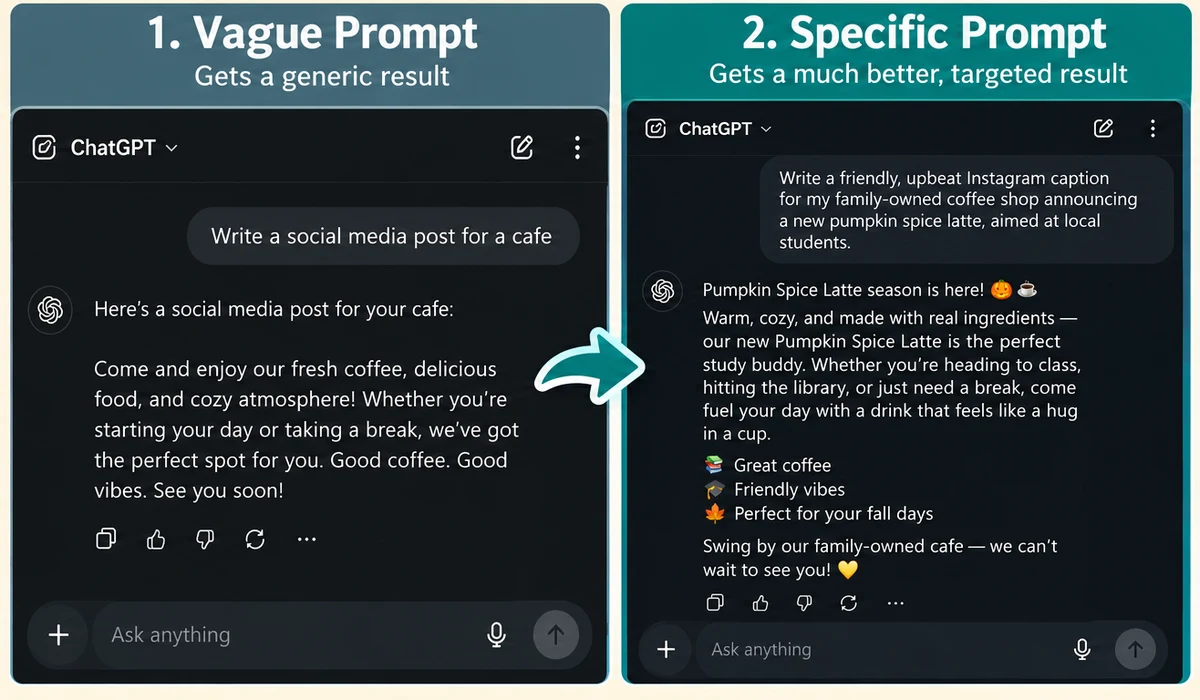
A quick tip: Always give the AI context. Instead of asking “Write a social media post for a cafe,” try “Write a friendly, upbeat Instagram caption for my family-owned coffee shop announcing a new pumpkin spice latte, aimed at local students.” The more detail you provide, the better the result. You can see the difference below — same tool, same minute, very different results.
If phrasing it well feels like the hard part, QuickPrompts is a free tool that does exactly this: you describe what you need in plain English, and it writes the properly structured prompt for you.
2. Customer Service and Support
Customers expect fast answers — often outside of business hours. You can’t be awake 24/7, but AI can.
Adding an AI chatbot to your website or social pages means common questions get answered instantly, day or night. “What are your hours?” “Do you offer delivery?” “Where are you located?” These predictable questions can be handled automatically, freeing you to deal with the conversations that truly need a human touch.
Customers are increasingly comfortable with this. In a 2025 survey of over 1,000 consumers in the US, UK and Canada by contact-centre software company Five9, 59% said they would rather use an instant AI chatbot than wait for a live agent, and 86% try self-service options before contacting support at all.

Beyond chatbots, AI can help you respond to reviews, draft polite replies to complaints, and even translate messages for international customers.
3. Automating Time-Consuming Admin Work
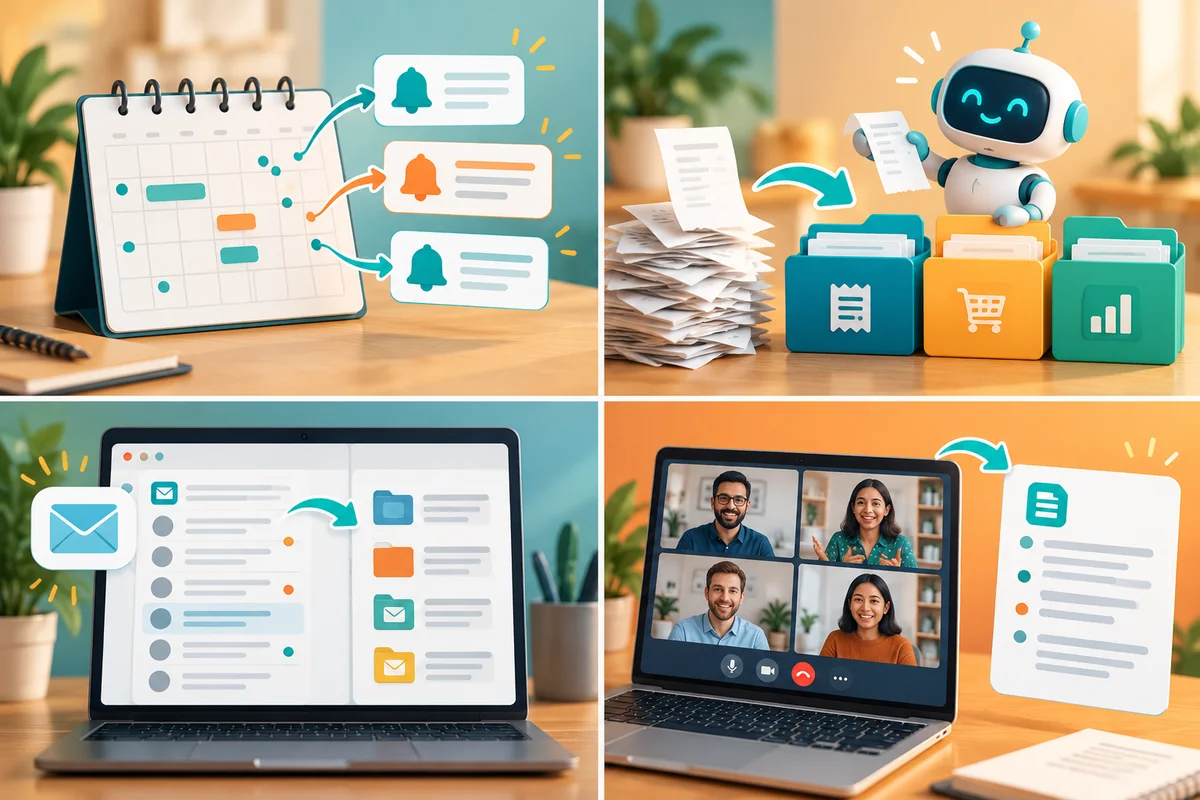
Behind every small business is a mountain of admin work that quietly eats up hours. Consider what AI can take off your plate:
- Scheduling: AI assistants can manage your calendar, book appointments, and send reminders.
- Bookkeeping: Many accounting platforms now use AI to categorize expenses, flag errors, and generate reports.
- Email management: AI can sort your inbox, summarize long threads, and draft replies for you to approve.
- Note-taking: AI tools can join your virtual meetings, transcribe them, and hand you a tidy summary with action items.
The time adds up. Intuit reports that 45% of QuickBooks customers using its AI-powered bank feed save 12 hours a month on bookkeeping — that’s more than a full working day and a half, every month, from one task.
Real-world example
Plex Coffee, a growing café business, had a 25-page staff handbook that, in the founder’s words, “nobody was really engaging with.” He uploaded it into a custom version of ChatGPT and shared it with new staff. The result: onboarding went from weeks to days, and routine questions in the team WhatsApp group dropped by more than 50%. (Source: OpenAI case study)
Each of these might save only a few minutes here and there — but added up across a month, you’re reclaiming entire workdays. For a fuller list, see 25 everyday tasks AI can automate.
4. Understanding Your Customers with Data
You’re sitting on more information than you realize — sales records, website traffic, customer feedback, and social media engagement. The problem is finding the time and skill to make sense of it all.
AI can analyze this data for you and surface patterns you’d never spot manually. Which products sell best on weekends? What time of day do your emails get opened? Which customers are most likely to return? These insights help you make smarter decisions instead of relying on guesswork. Among small business owners already using AI, 51% say it gives them better data for decision-making (Goldman Sachs).
5. Boosting Sales and Lead Generation
AI can also play a direct role in bringing in revenue. It can help you identify promising leads, personalize follow-up messages, and recommend the right products to the right customers. Some tools can even predict which prospects are most likely to buy, so you spend your energy where it counts.
Does it pay off? In the U.S. Chamber of Commerce’s 2025 survey of 3,870 small businesses, 85% of those using AI said their sales had increased over the past year, and 84% said their profits had. These are owners’ own reports, and they don’t prove AI caused the growth — but they do show that businesses using AI aren’t finding it a drag.
How to Get Started: A Simple 4-Step Plan
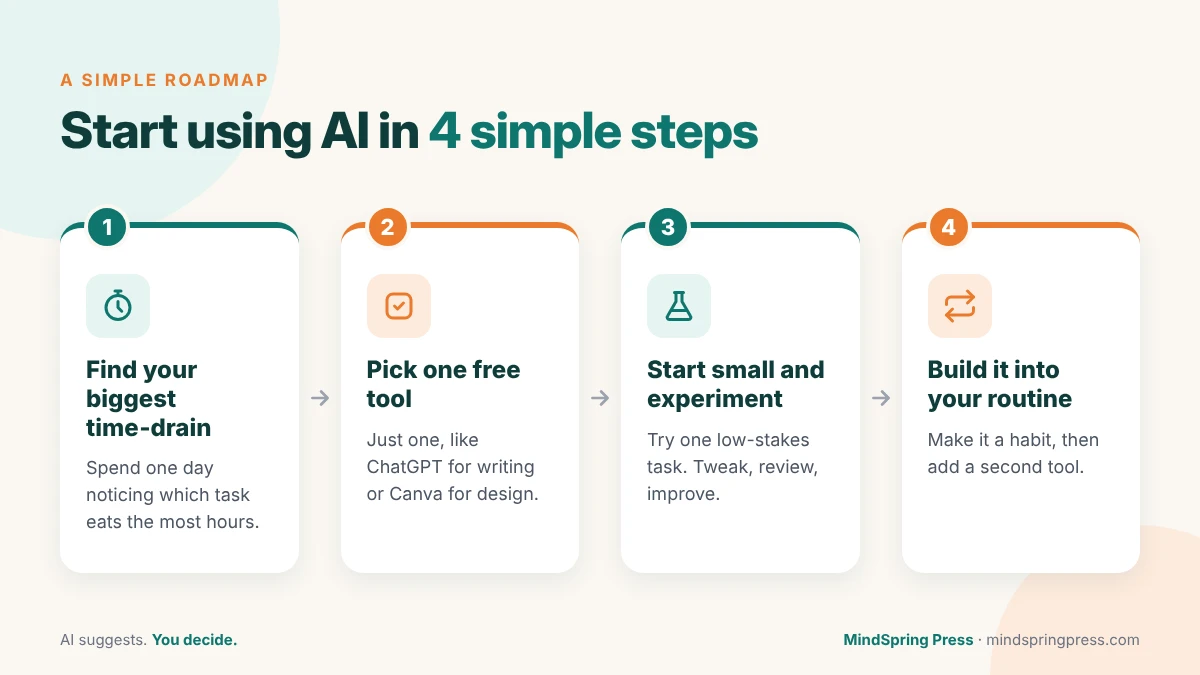
Feeling inspired but unsure where to begin? Follow this roadmap to put AI to work without the overwhelm.

Step 1: Identify your biggest time-drain. Spend a day noticing which tasks frustrate you most or eat up the most hours. That’s your starting point. The best first project is the one that gives you back the most time. For Kevin English, owner of Keg Built, it was data entry: using ChatGPT on a single 30-page contractor quote, he says, “saved me at least 10 hours of data entry” (OpenAI).
Step 2: Pick one tool and try it free. Almost every popular AI tool offers a free version or trial (see the table further down). Don’t sign up for ten things at once. Choose one — say, ChatGPT for writing or Canva for design — and explore it for a week.
Step 3: Start small and experiment. Use AI for a low-stakes task first, like drafting one email or one social post. Review the output, tweak your instructions, and watch how quickly the results improve. Remember, you’re always in control — AI suggests, you decide.
Step 4: Build it into your routine. Once a tool proves its worth, make it a regular habit. Then, and only then, add a second tool for a different task. Gradual adoption beats a chaotic overhaul every time.
Tips for Choosing the Right AI Tools
With thousands of options out there, picking the right tools can feel overwhelming. Keep these guidelines in mind:
- Start with free or low-cost tools. You can accomplish a surprising amount before ever paying a cent.
- Prioritize ease of use. If a tool requires a tutorial just to open it, move on.
- Read reviews from other small businesses. Look for tools designed with owners like you in mind, not enterprise giants.
- Check data privacy. It’s owners’ top worry for good reason: 44% of small businesses name data privacy and security as their biggest concern with AI (SBE Council). Make sure any tool you use is clear about how it handles your business and customer information, and don’t paste sensitive customer details into a free chatbot.
- Make sure it solves a real problem. Don’t adopt AI because it’s trendy. Adopt it because it saves you time, money, or stress.
Popular AI tools at a glance
Every tool below has a free plan, so you can test it before spending anything.
| Tool | Best for | Free plan | Paid plans from (per month) |
|---|---|---|---|
| ChatGPT | All-round writing, ideas and questions | Yes | Go $8; Plus $20 |
| Claude | Long documents and careful writing | Yes, with usage limits | Pro $20 ($17 if paid yearly) |
| Google Gemini | Gmail and Google Docs users | Yes | Google AI Plus $4.99 |
| Microsoft Copilot | Word, Excel and Outlook users | Yes, limited | Microsoft 365 Personal $9.99 |
| Canva | Social graphics, flyers and resizing | Yes, 20 AI uses a month | Pro $120 a year (about $10) |
| Grammarly | Polishing emails and copy | Yes, 100 AI prompts a month | Pro $12 |
| Otter.ai | Meeting notes and transcripts | Yes, 300 minutes a month | Pro $16.99 |
| Tidio | Website chatbot | Yes, 50 conversations | Starter about $24 |
US prices as listed on each tool’s pricing page, October 2026. Prices change often, so check before you sign up.
When you’re ready to compare specific options side by side, our roundup of the best AI tools for small businesses breaks them down by category and price.
A Word of Balance: Keep the Human Touch
As powerful as AI is, it works best as your assistant — not your replacement. Customers still value authenticity, warmth, and genuine human connection. In a 2025 survey of 1,011 US adults for Kinsta, 88.8% said companies should always offer the option to speak to a human. Use AI to handle the busywork, but let your personality, your judgment, and your care shine through in everything that reaches your customers.
Always review what AI produces before it goes public. Accuracy is owners’ second-biggest worry about AI (43%, per the SBE Council), and a quick human check is how you handle it. Treat AI’s output as a smart first draft rather than the final word. The winning formula is simple: AI handles the heavy lifting, and you add the human magic on top.
Frequently Asked Questions
How can a small business start using AI?
Pick your single most time-consuming task, choose one free tool (ChatGPT, Claude, Gemini or Copilot are the easiest starting points), and try it on that task for a week. If it saves you time, make it part of your routine before adding a second tool.
How much does AI cost for a small business?
You can start for free. ChatGPT, Claude, Gemini, Copilot, Canva and most other popular tools have free plans. Paid plans for one person typically cost between about $5 and $25 a month.
What is the best AI tool for a small business?
There’s no single best tool. For writing and everyday questions, a general assistant like ChatGPT, Claude or Gemini is the easiest start. If you live in Gmail and Google Docs, try Gemini; if you work in Word and Outlook, try Copilot. For graphics, start with Canva.
Is it safe to put business data into AI tools?
Be careful with it. Check each tool’s privacy settings, consider a business plan for sensitive work (these usually offer stronger data protections), and never paste passwords, payment details or private customer information into a free chatbot.
Will AI replace my employees?
For most small businesses, AI takes over tasks, not jobs. In the U.S. Chamber of Commerce’s 2025 survey, 82% of small businesses using AI said their workforce had grown over the past year.
Can AI help with small business marketing?
Yes, and it’s where most owners start. Nearly half of small businesses (48%) already use AI in their marketing, mostly to write email and social media copy and to create visuals.
The Bottom Line: Your AI Journey Starts Today
Here’s the most important takeaway — you don’t need to wait, and you don’t need to be an expert. Starting with AI isn’t a question of having the right budget or technical skills. It’s simply a matter of taking that first small step.
Pick one task. Try one tool. See the result for yourself. That single experiment can spark a wave of efficiency that transforms how you run your business.
The future of small business isn’t about working harder. It’s about working smarter — and that future is already here, waiting for you to begin.
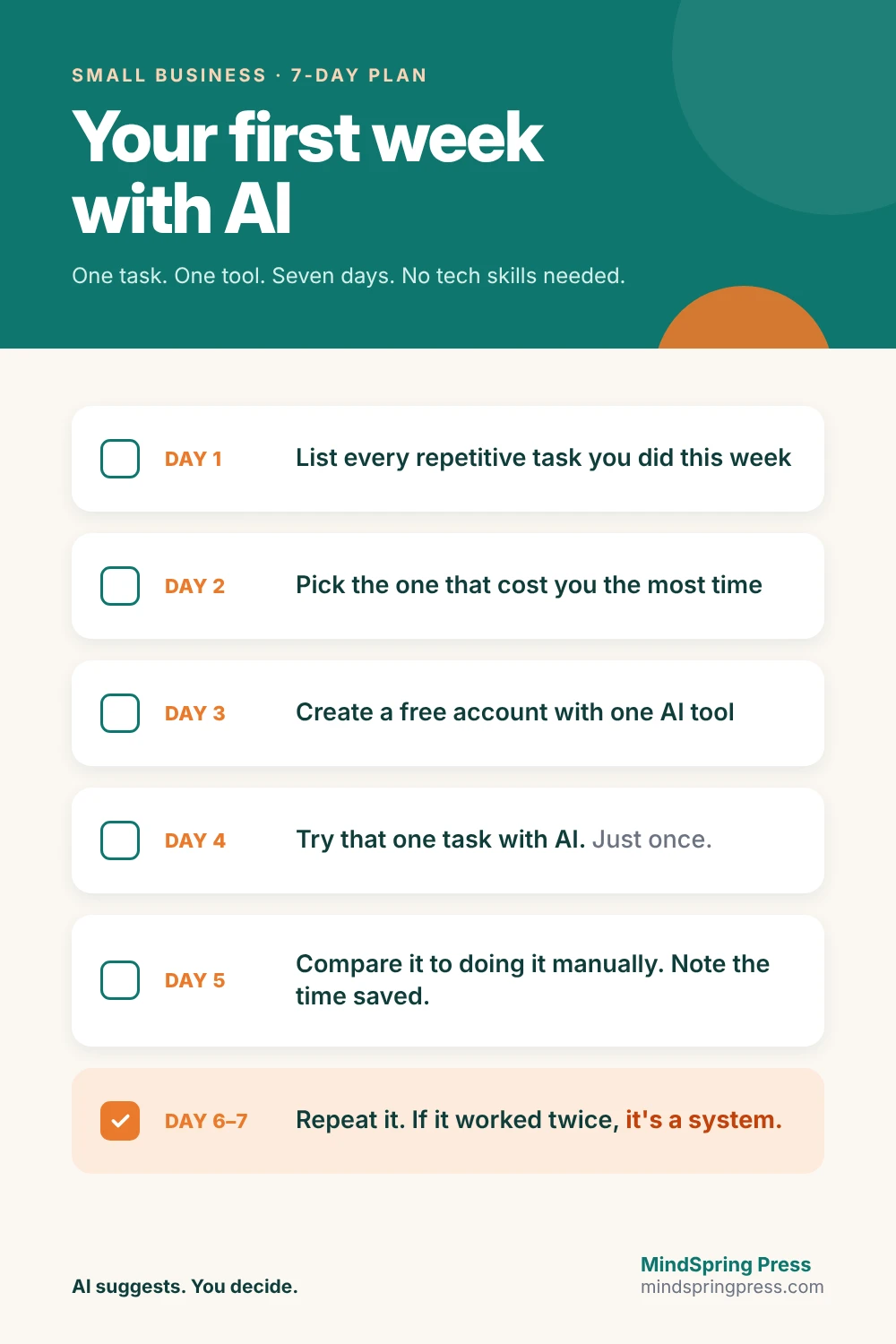
Your first week with AI
- Day 1 — List every repetitive task you did this week
- Day 2 — Pick the one that cost you the most time
- Day 3 — Create a free account with one tool
- Day 4 — Try that one task with AI. Just once.
- Day 5 — Compare the result to doing it manually. Note the time saved.
- Day 6–7 — Repeat it. If it worked twice, it’s a system.
Part of the MindSpring Press AI for Small Businesses series — practical, no-jargon AI guidance for small business owners.
Sources
Every figure in this guide links to its original source.
- U.S. Chamber of Commerce, Empowering Small Business (2025)
- U.S. Census Bureau, AI use among businesses (May 2026)
- U.S. SBA Office of Advocacy, AI in Business: Small Firms Closing In (Sept 2025)
- Goldman Sachs 10,000 Small Businesses Voices survey (Oct 2025)
- Goldman Sachs 10,000 Small Businesses Voices survey (June 2025)
- Constant Contact, Small Business Now (Sept 2025)
- Five9 2025 Customer Experience Report, via CallCentreHelper
- Intuit press release (July 2025)
- SBE Council, Small Business Check Up and Tech Use Survey (Oct 2025)
- Kinsta consumer survey, via Business Wire (Apr 2025)
- OpenAI, Plex Coffee case study
- OpenAI, ChatGPT for small business program